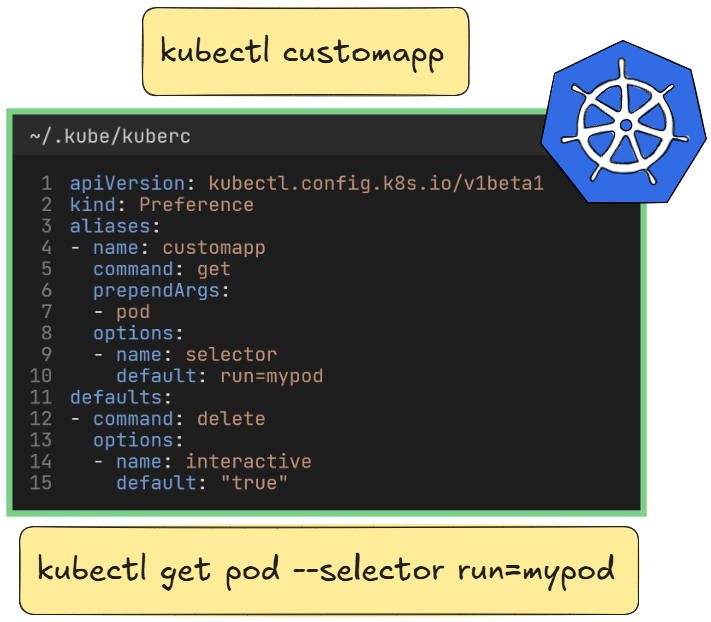
Kubernetes comes with a wide range of helpful tools. In this short tutorial, we’ll take a look at the kuberc feature, which allows you to create aliases directly in Kubernetes without needing the .bashrc file.
This feature was introduced with the KEP-3104 and is currently in the Beta stage. More KEPs (Kubernetes Enhancement Proposals) can be found here.
The following code was tested with Kubernetes version v1.36 and works with v1.34+.
Enable kuberc
To enable this feature, ensure that the environment variable KUBERC is not set and KUBECTL_KUBERC is set to true.
unset KUBERC

export KUBECTL_KUBERC=trueIf everything is setup correctly, you should be able to use the kuberc subcommand.
dominik@cp:~$ kubectl kuberc
Manage user preferences (kuberc) file.

 The kuberc file allows you to customize your kubectl experience.
Before diving deep into the functionality, we start with two simple examples. First, we look at setting up an alias and then using the override function. After that, we proceed with the deep dive.
Create aliases
An alias in kuberc works the same as in bash: You define a shorthand command that is expanded to a valid, longer command.
For the example, you first create a Pod with the following command.
kubectl run mypod --image nginxYou can now list the running Pod and display its labels.
kubectl get pod --show-labelsAs you should see, the Pod has the labels run=mypod.
dominik@cp:~$ kubectl get pod --show-labels
NAME    READY   STATUS    RESTARTS   AGE   LABELS
mypod   1/1     Running   0          14s   run=mypod
Now you create an alias that uses labels to show the Pod. Below is an example of a kuberc file that creates a new alias called customapp. This customapp alias expandeds to kubectl get pod –selector run=mypod.
cat << 'EOF' > ~/.kube/kuberc
apiVersion: kubectl.config.k8s.io/v1beta1
kind: Preference
aliases:
- name: customapp    # alias name
  command: get       # kubectl get
  prependArgs:       # kubectl get pod
  - pod
  options:           # use label selector
  - name: selector   # kubectl get pod --selector run=mypod
    default: run=mypod
EOFThe new alias is now available with the kubectl command.
kubectl customappWhen you execute the command, you list the previously created Pod by its label.
dominik@cp:~$ kubectl customapp
NAME    READY   STATUS    RESTARTS   AGE
mypod   1/1     Running   0          2m47s
This feature is especially useful if you run different applications in your cluster and you want a short command that displays all related objects for this application.
Create defaults
Now we look at the defaults. A default allows us to override an existing command and change the default value for options.
In the example below, we append –interactive=true to every delete command. With this change, you are asked for confirmation each time you delete objects.
cat << 'EOF' > ~/.kube/kuberc
apiVersion: kubectl.config.k8s.io/v1beta1
kind: Preference
aliases:
- name: customapp    # alias name
  command: get       # kubectl get
  prependArgs:       # kubectl get pod
  - pod
  options:           # use label selector
  - name: selector   # kubectl get pod --selector run=mypod
    default: run=mypod
defaults:
- command: delete    # add --interactive=true
  options:
  - name: interactive
    default: "true"
EOFYou can test this new behavior with the Pod created earlier.
kubectl delete pod mypod
# evaluates to
# kubectl delete pod mypod --interactive=trueWhen everything was done correctly a confirmation is needed to delete the Pod.
dominik@cp:~$ kubectl delete pod mypod
You are about to delete the following 1 resource(s):
pod/mypod
Do you want to continue? (y/N):
deletion is cancelled
Deep Dive
In the following, we will do a deep dive and look at some more complex setups. A reference for all available options can be found on the official Kubernetes website here.
Precedence
When using a configuration file, precedence is always important. The kuberc file is evaluated in the following order:
--kubercflagKUBERCenvironment variable$HOME/.kube/kuberc(default)
Aliases
Below is a reference showing how the alias is expanded into a valid kubectl command.
kubectl <alias-name>
# evaluates to
kubectl <command> <prependArgs> <options> <appendArgs>- alias-name: Name of the alias
- command: A single command optional with subcommands (run, create, rollout status)
- prependArgs: Arguments which are placed after the command from the kuberc
- options: Add options for a command without the dashes. Only the long form is valid.
- appendArgs: Arguments which are placed at the end of the whole command. Helpful for executing commands like in kubectl exec mypod –namespace default — hostname
Here is a full example with all available options.
apiVersion: kubectl.config.k8s.io/v1beta1
kind: Preference
aliases:
- name: khost    # 1. alias-name
  command: exec  # 2. command
  prependArgs:   # 3. prependArgs
  - mypod
  options:       # 4. options
  - name: namespace
    default: "default"
  appendArgs:    # 5. appendArgs
  - --
- hostnameIf you execute the alias the hostname for the Pod mypod is shown.
dominik@cp:~$ kubectl khost
mypod
Helpful aliases
Here are some helpful aliases for your kuberc file.
Create a YAML output for a Pod
apiVersion: kubectl.config.k8s.io/v1beta1
kind: Preference
aliases:
- name: dpod
  command: run
  options:
  - name: namespace
    default: "default"
  - name: image
    default: "nginx"
  - name: output
    default: "yaml"
  - name: dry-run
default: "client"You can use it with kubectl dpod mypod, which expands to kubectl run mypod –namespace=default –image=nginx –output yaml –dry-run=client.
Important: a name for the Pod is required after dpod!
dominik@cp:~$ kubectl dpod mypod
apiVersion: v1
kind: Pod
metadata:
  labels:
    run: mypod
  name: mypod
  namespace: default
spec:
  containers:
  - image: nginx
    name: mypod
    resources: {}
  dnsPolicy: ClusterFirst
  restartPolicy: Always
status: {}
Open a bash shell
apiVersion: kubectl.config.k8s.io/v1beta1
kind: Preference
aliases:
- name: bash
  command: exec
  options:
  - name: stdin
    default: "true"
  - name: tty
    default: "true"
  appendArgs:
  - --
- /bin/bashYou can use it with kubectl bash <pod name>.
dominik@cp:~$ kubectl bash mypod
root@mypod:/#
Restart a Deployment
apiVersion: kubectl.config.k8s.io/v1beta1
kind: Preference
aliases:
- name: re
  command: rollout restart
  prependArgs:
- deploymentYou can use it with kubectl re <deployment name> to restart you deployment.
dominik@cp:~$ kubectl create deployment mydeploy --image=nginx
deployment.apps/mydeploy created

dominik@cp:~$ kubectl re mydeploy
deployment.apps/mydeploy restarted
Defaults
The defaults allow you to override exiting command options with a new default. Their syntax is quiet simple.
kubectl <command> <options>- command: A single command, optional with subcommands (run, create, rollout status)
- options: Add a new default for options. Only the long form is valid.
Here is a full example with all available options.
apiVersion: kubectl.config.k8s.io/v1beta1
kind: Preference
defaults:
- command: create deployment # 1. command
  options:                   # 2. options
  - name: replicas
    default: "3"
  - name: image
default: "nginx"If you execute the kubectl create deployment command, the image will be set to nginx and the replicas will be set to 3.
dominik@v137:~$ kubectl create deployment mydploy -o yaml --dry-run=client
apiVersion: apps/v1
kind: Deployment
metadata:
  labels:
    app: mydploy
  name: mydploy
spec:
  replicas: 3
  selector:
    matchLabels:
      app: mydploy
  strategy: {}
  template:
    metadata:
      labels:
        app: mydploy
    spec:
      containers:
      - image: nginx
        name: nginx
        resources: {}
status: {}
Helpful defaults
Here are some helpful defaults for your kuberc file.
Always ask for confirmation when deleting
apiVersion: kubectl.config.k8s.io/v1beta1
kind: Preference
defaults:
- command: delete
  options:
  - name: interactive
default: "true"After executing the delete command a confirmation is needed.
dominik@cp:~$ kubectl delete pod mypod
You are about to delete the following 1 resource(s):
pod/mypod
Do you want to continue? (y/N):
Use the server side apply
apiVersion: kubectl.config.k8s.io/v1beta1
kind: Preference
defaults:
- command: apply
  options:
  - name: server-side
default: "true"All applys will use the server-side option. More about this server-side can be found here.
Next Article
This sums up all the important points about kuberc. If you are interested in more Kubernetes related articles take a look at here.
Contact
For further questions contact me at: blog [@] dominiklandau.de