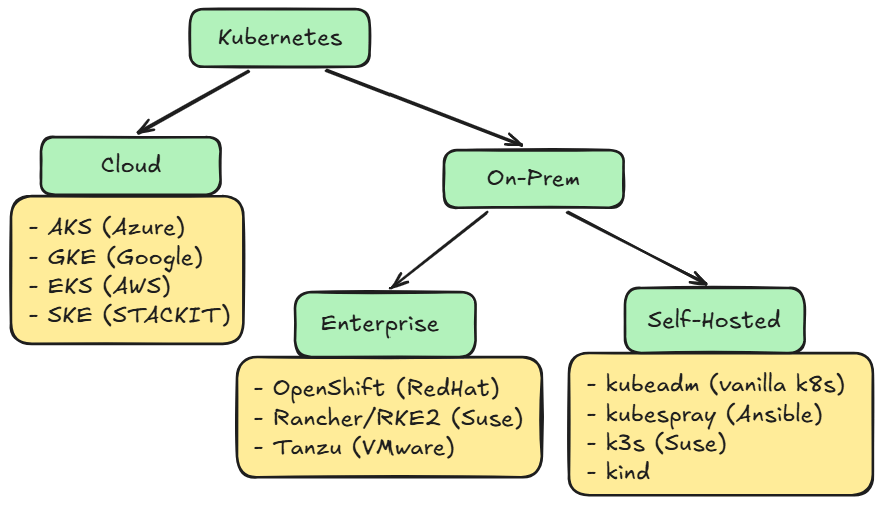
Kubernetes is the go-to solution for running containerized applications. Despite being fully open source, there are a lot of different “distributions” of Kubernetes. Here we will take a look at the different offerings, ranging from the Cloud to On-Prem, and what they provide.
Cloud
One of the most popular and easier way on deploying a Kubernetes Cluster is using the Cloud. Here you only need to click through an installation window and set some variables. After this the Cloud takes over and creates in the next 10 minutes a Kubernetes Cluster in the background.
Each of the Hyperscalers has its own Kubernetes distribution.
- Azure with AKS (Azure Kubernetes Services)
- AWS with EKS (Elastic Kubernetes Services)
- GCP with GKE (Google Kubernetes Engine)
Even smaller companies provide their own solutions
- STACKIT with SKE (STACKIT Kubernetes Engine)
- DigitalOcean with DOKS (DigitalOcean Kubernetes)
Container Services
Besides the normal Kubernetes offerings there are also a lot of different variations. Some offer a fully managed Kubernetes where you only deploy the application without access to the underling hardware. Or you can use an other container solution if you don’t need the complexity of Kubernetes.
Here are some articles which focus on specific cloud provider:
- Kubernetes in Azure
- Kubernetes in GCP
Pros and Cons
With the short overview of the different solution here are some pros and cons for Kubernets in the cloud.
Pros
- Easy to setup
- Native integrations (e.g. monitoring, user management)
- Fast scaling
- Global datacenters
Cons
- Expensive to run
- Can’t access the Control Plane
- Additional complexity with the Cloud
On-Prem
If a Kubernetes in the Cloud does’t fit your need, you can also deploy it in your own datacenter on-prem. Here are two ways doing it. First you can choose an enterprise solution which offers support and native integrations or you can go the fully self-managed way.
Enterprise
On the enterprise side of Kubernetes on on-prem there are three big solutions
- VMware with Tanzu
- RedHat with OpenShift
- Suse with Rancher and RKE2
Depending on the software you are already using, one of these makes more sense than the others.
Pros
- Easy to setup
- Native integrations (e.g. monitoring, user management)
- Fully customizable
Cons
- Expensive to run
- Limited to your datacenter
- Fully responsible for everything
Self-Hosted
The last option on hosting Kubernetes would be doing everything by yourself. Depending on what you want to do, here are some options to start with
- kubeadm (setup a vanilla Kubernetes)
- kubespray (setup Kubernetes with Ansible)
- k3s (small Kubernetes from Suse)
- Kind (Kubernetes in Docker, for testing)
- MicroK8s (small Kubernetes from Canonical)
- kOps (Create Kubernetes in the Cloud on VMs)
- Cluster API (Manage the lifecycle of Kubernetes Cluster)
These are a few tools you can use to create a Kubernetes Cluster. The use case is highly dependent on your needs. If you are new to Kubernetes I recommend my Kubernetes series where you start with the creation of a Kubernetes Cluster with kubeadm: Kubernetes Part 1 – Installation
Pros
- Fully customizable
- No license cost
- Learning opportunity
Cons
- Fully responsible for everything
- Needs additional tools (monitoring, logging)
Next Article
If you are new to Kubernetes take a look at my Kubernetes beginner series: Kubernetes Part 1 – Installation
Contact
For further questions contact me at: blog [@] dominiklandau.de