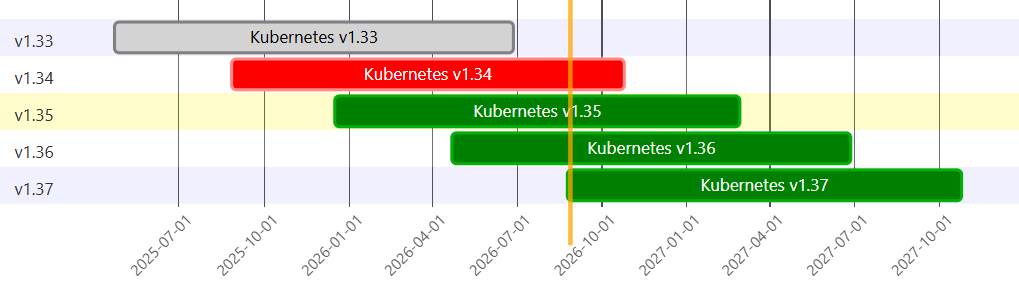
Every four month a new Kubernetes release is due. On August 26, 2026, Kubernetes version 1.37 was released and we will walk through some interesting changes. What is new, what will come in the future and what was removed.
Now it is also the right time to audit your cluster versions, in one month Kubernetes version v1.34 will reach its end of life.
Upgrade from v1.36 to v1.37
Before diving into the changes, we first take a look at the things you need to keep in mind when upgrading from v1.36 to v1.37. The official release notes provide a dedicated “Must Read Before You Upgrade” section here. Below is a condensed version of those notes::
- If the Cluster uses SELinux: Checkout the blog here
- If you are using the PodGroup feature (disabled by default): Convert the DisruptionMode enum field
- The eventRecordQPS (events per second) now treats 0 as unlimited: Check your value with the following command
sudo curl -k --key /etc/kubernetes/pki/apiserver-kubelet-client.key --cert /etc/kubernetes/
pki/apiserver-kubelet-client.crt https://127.0.0.1:10250/configz | jq .kubeletconfig | grep event- The kubelet configuration gets dumped at startup: Check permissions, that no authorized person can read it
What was changed
In this release, 16 features became Stable, 23 where switched to Beta and 27 were introduced as Alpha. Additionally two features were deprecated.
Stable
Out of the 16 enhancements we take a look at five, including some examples. If you review the full list of changes, you’ll notice a strong focus on expanding support for Dynamic Resource Allocation (DRA) and extending Pod functionality.
DRA | KEP-6072 | KEP-5055 | KEP-5004
The big topic in this release was DRA, which improves the handling of external devices. Due to the high demand for AI, GPU management is more important than ever, and with DRA we can manage these resources effectively. In total, 3 KEPs graduated to Stable, 3 moved to Beta, and 7 are currently in Alpha. This means that in the next releases, a lot more DRA-related functionality will be added.
The DRA KEPs that moved to Stable focus on the transition from extended resources to DRA, the exposure of NUMA node information, and the addition of taints for devices. Together, these changes make it easier to migrate existing GPU workloads to DRA, enable more topology-aware scheduling, and give cluster operators finer control over which Pods can use specific devices.
KYAML | KEP-5295
KYAML is a subset of YAML that combines the readability of YAML with the structure of JSON. Below is a simple example how a Pod definition looks in KYAML.
dominik@cp:~$ kubectl run mypod --image=nginx -o kyaml --dry-run=client
---
{
  kind: "Pod",
  apiVersion: "v1",
  metadata: {
    name: "mypod",
    labels: {
      run: "mypod",
    },
  },
  spec: {
    containers: [{
      name: "mypod",
      image: "nginx",
      resources: {},
    }],
    restartPolicy: "Always",
    dnsPolicy: "ClusterFirst",
  },
  status: {},
}
If we look at the KYAML output, we can see that instead of relying solely on YAML’s whitespace-based syntax, maps are now represented with curly braces {} and arrays with square brackets []. If you’re looking for a more robust and still human-readable alternative to traditional YAML, KYAML is worth considering.
Pod Certificates | KEP-4317
Pod Certificates introduce a mechanism to issue X.509 certificates for Pods. With this feature, you can obtain certificates for your workloads from an arbitrary CA. To make this work, you need an external controller that manages the certificate lifecycle. Currently, this is still a fairly niche capability, but in scenarios that require strong mutual TLS or custom PKI integration, it can be very helpful.
Cluster Trust Bundles | KEP-3257
Cluster Trust Bundles are an API extension that lets you add root certificates to Kubernetes and make them accessible to Pods. These new objects can be exposed inside a Pod via projected volumes. By default, the cluster’s root CA is already available through this mechanism. With this approach, the default ConfigMap containing the cluster CA becomes redundant and can be removed in future releases.
dominik@cp:~$ kubectl get clustertrustbundles.certificates.k8s.io
NAME                                                            SIGNERNAME
kubernetes.io:kube-apiserver-serving:a13305575cbb055d5460a392   kubernetes.io/kube-apiserver-serving
If you want to use the cluster’s CA in the Pod via a projected volume, you first need to label the ClusterTrustBundle.
dominik@cp:~$ kubectl label clustertrustbundles kubernetes.io:kube-apiserver-serving:a13305575cbb055d5460a392 kubernetes=caAfter labeling you can use the following YAML file to make the CA accessible.
apiVersion: v1
kind: Pod
metadata:
  namespace: default
  name: trust-bundle-pod
spec:
  containers:
  - name: nginx
    image: nginx
    volumeMounts:
    - name: credentials
      mountPath: /var/run/creds
  volumes:
  - name: credentials
    projected:
      sources:
      - clusterTrustBundle:
           signerName: kubernetes.io/kube-apiserver-serving
           path: ca_certificates.pem
           labelSelector:
             matchLabels:
kubernetes: caIf everything was done correctly the Pod should start.
dominik@cp:~$ kubectl get pod
NAME               READY   STATUS    RESTARTS   AGE
trust-bundle-pod   1/1     Running   0          5s
Pod Level Resource Specifications | KEP-2837
With the Pod-level resources we now have the ability to set resource request and limits for the entire Pod instead of defining them for each container individually.
apiVersion: v1
kind: Pod
metadata:
  labels:
    run: mypod
  name: mypod
spec:
  resources:           # new
    limits:            # new
      memory: "1024Mi" # new
      cpu: "4"         # new
    requests:          # new
      memory: "512Mi"  # new
      cpu: "2"         # new
  containers:
  - image: nginx
    name: mypod
    resources: {}
Beta
Beta features are always a good indicator of what’s coming in the future. Depending on the feature, it sometimes needs to be explicitly enabled before you can use it. In this section, we’ll take a look at three of these features.
Gang Scheduling (diabled by default) | KEP-4671
With Gang Scheduling, we can now declare that a set of Pods belongs together and should only be scheduled if all of them can be placed. In other words, it’s an “all-or-nothing” approach. To enable it, a few configuration changes are required.
For the kube-apiserver add the commands:
spec:
  containers:
  - command:
    - kube-apiserver
    - --feature-gates=GenericWorkload=true
    - --runtime-config=scheduling.k8s.io/v1beta1
For the kube-scheduler add:
spec:
  containers:
  - command:
    - kube-scheduler
    - --feature-gates=GenericWorkload=true
And for the kube-controller-manager add:
spec:
  containers:
  - command:
    - kube-controller-manager
    - --feature-gates=GenericWorkload=true
For the scheduling to work, two new API objects are available.
- Workload, which acts as a template and
- PodGroup, which is a direct instance and defines the number of Pods needed.
Finally, each Pod references the PodGroup it belongs to.
apiVersion: scheduling.k8s.io/v1beta1
kind: Workload
metadata:
  name: wl
spec:
  podGroupTemplates:
  - name: worker
    schedulingPolicy:
      gang:
        minCount: 2
---
apiVersion: scheduling.k8s.io/v1beta1
kind: PodGroup
metadata:
  name: pg
spec:
  workloadRef:
    workloadName: wl
    templateName: worker
  schedulingPolicy:
    gang:
      minCount: 2
---
apiVersion: v1
kind: Pod
metadata:
  name: pod-0
spec:
  schedulingGroup:
    podGroupName: pg
  containers:
  - name: nginx
image: nginxAfter applying the file and inspecting the created objects, we can see that the Pod remains pending until a second Pod is scheduled, because we set minCount to 2.
dominik@cp:~$ kubectl get workload,podgroup,pod
NAME                            AGE
workload.scheduling.k8s.io/wl   32s

NAME                            POLICY   WORKLOAD   STATUS    AGE
podgroup.scheduling.k8s.io/pg   Gang     wl         Pending   32s

NAME        READY   STATUS    RESTARTS   AGE
pod/pod-0   0/1     Pending   0          32s
Rootless mode (diabled by default) | KEP-2033
By default, Kubernetes components still run as root. This KEP moves towards running components in user namespaces and reducing the attack surface in case of an container escape. While this improves security, it can interfere with some functionality.
HPA supports scaling to/from zero pods for object/external metrics | KEP-2021
By default, the Horizontal Pod Autoscaler (HPA) cannot scale to zero. Typically, you need to install an additional tool like KEDA (Kubernetes Event-Driven Autoscaling) to use this feature. With the introduction of this KEP, the HPA is now able to scale to zero for object and external metrics.
Next Article
If you are new to Kubernetes take a look at my Kubernetes beginner series: Kubernetes Part 1 – Installation
Contact
For further questions contact me at: blog [@] dominiklandau.de